
Norton Private Browser
NortonMobileCommunication
4.2308.00 Reviews
- Version
- 8.19.0
- Installs
- 500.00K
- Age Rating
- Everyone
Screenshots
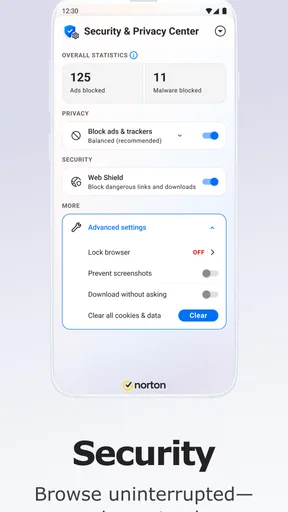
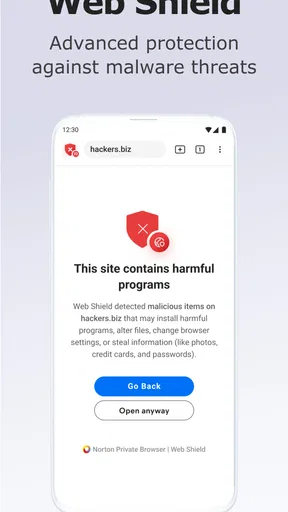
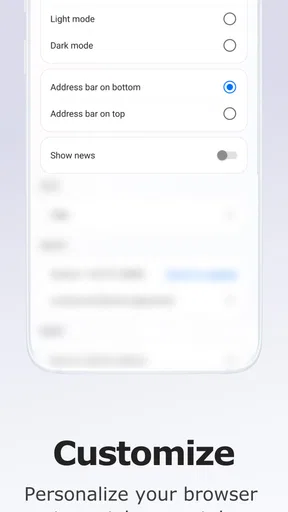
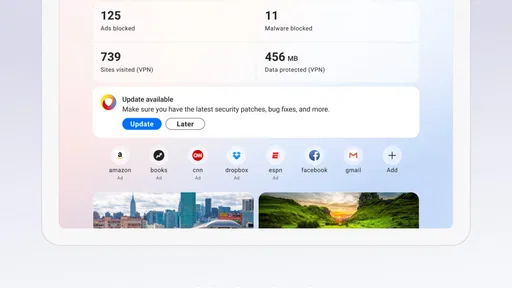
Our Review of Norton Private Browser
 Analysis by Appyee
When I try a new browser, I care about more than whether pages open quickly. I want to know if I can read comfortably, move around without confusion, block the distractions that make a page difficult to use, and rely on it in ordinary situations such as checking a message, comparing products, or looking up instructions. Norton Private Browser is a free communication-focused app from NortonMobile that approaches browsing through privacy and advertising control. After using it, I found its biggest appeal is not a long list of extras, but a cleaner way to reach web content on a phone.
The app is available for Android devices running version 10 or later, carries an Everyone age rating, and is currently at version 8.19.0. It has built a 4.2 average from around 1.9 thousand ratings, with more than 500 thousand installs. Those figures suggest a browser that has found a practical audience without feeling like a complicated specialist tool. My overall impression is that it suits people who want a straightforward private browsing option, especially when advertising clutter affects concentration or makes pages harder to follow.
How the browser feels to read and navigate
The first thing I noticed was how much the browsing experience depends on what the page itself is doing. Norton Private Browser cannot redesign every website, but its advertising-blocking focus can make busy pages feel less crowded. Removing some promotional interruptions means fewer elements compete with the article, form, or search result I actually opened. That is useful for anyone who loses their place easily when a page is packed with moving banners, repeated sales panels, or sudden visual interruptions.
I also see a practical benefit for readers who use a phone one-handed. A browser that reduces clutter leaves more of the useful page visible, so I spend less time searching through advertising blocks to find the next paragraph or the control I need. This is not the same as a dedicated reading mode, and I would not assume every website will become perfectly calm. Still, the difference between a page with several distractions and one with fewer competing elements can be meaningful during short sessions.
Navigation is easiest when I treat the app as a focused browser rather than a full replacement for every tool on my phone. I use it for searches, articles, reference pages, shopping research, and sites where I would rather not be followed by a large advertising ecosystem. The simple workflow is valuable: open the browser, enter a destination, and concentrate on the page. People who want a browser packed with customization panels, extensive tab management, or deep synchronization controls may find the experience less compelling than a long-established general-purpose alternative.
For users with reading difficulties, visual fatigue, or attention-related challenges, less advertising can be more than a cosmetic improvement. It can reduce the number of decisions made before reaching the main content. My advice is to test the sites you visit most often instead of judging the app from one successful page. Some websites depend heavily on scripts or embedded elements, and blocking unwanted material can occasionally change how a page behaves. If a form or interactive section does not work as expected, temporarily checking the same site in another browser is a sensible backup.
A useful habit is to separate “I cannot find the content” from “the site is not loading correctly.” With an ad-blocking browser, a missing promotional panel may be exactly what should happen, while a broken login or checkout control needs investigation. I found this distinction important because a cleaner page can initially feel unfamiliar. Once I understood that the goal was to remove distractions rather than preserve every visual element, the interface made more sense.
Reading in everyday situations
Imagine that I am standing in a busy station and need to check a long set of travel instructions on my phone. I have limited time, one hand available, and little patience for pop-ups. A browser that keeps the page focused gives me a better chance of finding the relevant heading and scrolling to the right section. The same applies when I am following a recipe with messy hands, checking a repair guide beside a machine, or reading a health-information page while trying to concentrate on specific wording.
In these situations, privacy and readability overlap. I am less interested in browsing as entertainment and more interested in getting an answer without being pulled into unrelated content. Norton Private Browser feels strongest in that role. It is a practical second browser for tasks where I want a calmer screen, rather than an app I would choose solely because I need every advanced feature available on a desktop browser.
Motor, sensory, and attention considerations
Advertising affects motor access as well as visual comfort. When a page contains small close buttons, floating banners, or controls that shift position, tapping accurately becomes harder. Blocking some of that material can reduce accidental taps and the need for repeated corrections. I would not describe this as a complete answer for people with limited dexterity, because the underlying website still controls many buttons and layouts, but it can remove some avoidable obstacles before they reach the screen.
For people who experience motion sensitivity, fewer animated advertisements may make browsing less tiring. The benefit will vary by site, and the browser should not be treated as a guarantee that every animation disappears. However, the app’s central approach is relevant: when advertising is blocked, there are often fewer unrelated visual events competing for attention. I found that especially helpful on pages where I wanted to read rather than watch, swipe through promotions, or dismiss overlays.
People with low vision should approach the app with realistic expectations. A cleaner page may improve focus, but it does not automatically enlarge text, repair poor color contrast, or make every website keyboard-friendly. The browser can reduce clutter while the site remains difficult to read. I would pair it with the device’s own display and text settings, then test a few important websites. If a service is essential for work, education, or healthcare, I would not switch completely until its text, buttons, and forms feel comfortable in actual use.
For users who rely on spoken feedback or alternative input, the key question is how each website exposes its controls, not only which browser opens it. Norton Private Browser may provide a less distracting environment, but it cannot correct every accessibility problem built into a page. That is an important distinction. A browser can improve the surroundings without fixing missing labels, confusing form order, or poorly structured content on the destination site.
I also think about cognitive load. A browser becomes easier to use when I can predict what will happen after a tap. Ad blocking supports that predictability by reducing surprise content, but it can also create uncertainty when a website looks different from what I expect. My best workflow is to keep one browser for privacy-focused reading and another available for sites that require unusual compatibility. That is not a failure of the app; it is a practical way to avoid turning one tool into a solution for every browsing problem.
Privacy without making the experience intimidating
Privacy language can sound technical, yet the everyday benefit is simple: I can browse with less advertising interference and a stronger sense that the browser’s purpose is to protect the session. The store summary presents it as a private and secure browser with AdBlock for faster browsing, and that combination explains the app’s identity better than a long feature checklist would. It is aimed at people who want a more controlled route to websites without learning a complicated privacy system first.
That simplicity is helpful for family members or friends who are uncomfortable changing browser settings. The Everyone rating also makes the app approachable for a broad audience, although an age rating should not be confused with a promise that every website opened inside it is suitable for every person. I would still guide younger users according to the content and accounts they access, just as I would with any general browser.
One trade-off is that privacy and convenience do not always point in exactly the same direction. Some websites are designed around advertising-supported features, tracking tools, or scripts that may be affected by blocking. When a page behaves strangely, the fastest solution may be to use a different browser for that single task rather than repeatedly fighting the page. The app is most comfortable when the user values a cleaner, more private default and accepts that occasional compatibility checks may be necessary.
Access across different situations
Norton Private Browser is particularly useful when the surrounding context is distracting. On a small phone screen, advertising consumes a larger share of the available space than it does on a desktop monitor. In a quiet room, that may be merely annoying. On a bus, in a queue, or during a rushed work break, it can make the difference between finding information quickly and giving up. I found the app’s value clearer during these short, purposeful sessions than during long browsing journeys where I wanted extensive organization.
It can also help on older-feeling phones that struggle with pages overloaded by visual advertising, although I would avoid promising a specific speed increase for every device or website. The store summary connects ad blocking with faster browsing, and that makes sense when fewer advertising elements need to load. Real results depend on the page, connection, and phone. I judge it by whether the main content becomes available with less friction, not by expecting every site to feel instantly fast.
For people with limited data or inconsistent connections, a less cluttered page may be more practical because the browsing goal is usually the article, map, instructions, or form rather than the surrounding promotion. Again, the result will vary, and some sites may react unpredictably when content is blocked. I would use the app for information-heavy destinations first, then keep an alternative ready for services that are essential and sensitive to browser differences.
The app also makes sense for separating contexts. I might use my regular browser for accounts, saved routines, and sites that depend on familiar settings, while using Norton Private Browser for searches, reading, and links received in messages. This separation can make privacy choices easier to understand. Instead of trying to configure one browser for every purpose, I assign this one a clear job: browse with fewer distractions and a stronger privacy emphasis.
That approach answers a common practical question: does installing it mean I must replace the browser already on my phone? In my view, no. It works well as a complementary browser, and that may be the best setup for many people. Users who want one universal browser with all their existing habits in one place may prefer to stay with their current option. Users who frequently encounter aggressive advertising or want a dedicated private browsing space have a clearer reason to add it.
Where the experience still has limits
The biggest limitation is that browser-level improvements cannot repair a badly designed website. If text is tiny, buttons are unlabeled, the page relies on a confusing layout, or a service requires a particular script, Norton Private Browser may not solve the underlying problem. Its ad-blocking focus can reduce noise, but it should not be mistaken for a complete accessibility toolkit. People who need specialized browsing support should test their assistive setup directly with the websites that matter most.
Compatibility is another consideration. Blocking advertising content can occasionally affect page structure or interactive features. When I encounter that kind of friction, I check whether the problem is limited to one site before blaming the browser. A useful troubleshooting sequence is to reload, try the page again later, and then open it in a familiar alternative. If the alternative works immediately, I know the task matters more than insisting on one app for that moment.
I would also skip this app if my priority is deep customization rather than privacy and reduced clutter. People who organize large research projects through sophisticated tab systems, extensions, or tightly integrated desktop workflows may find a mainstream browser a better fit. Norton Private Browser is more convincing as a focused mobile tool than as a promise to replace every browsing environment.
Another barrier is expectation. The phrase “private browser” can lead some users to assume that every aspect of their online identity is invisible. I would not use any browser as an excuse to ignore account security, suspicious websites, or careful sharing habits. The app’s privacy-oriented design is useful, but safe browsing still depends on what I open, what I download, and which services I trust.
Finally, the app’s value is difficult to judge from a single dramatic feature. Its strongest improvements are gradual: fewer distractions, a more intentional browsing routine, and less temptation to interact with unrelated content. If someone rarely notices advertising or already has a setup that meets their reading and privacy needs, the change may feel modest. That is a fair reason not to install it, especially for users who dislike maintaining more than one browser.
An inclusive verdict for practical mobile browsing
After using Norton Private Browser, I see it as a thoughtful option for people who want a cleaner and more private way to browse on Android. Its most meaningful contribution to inclusive use is indirect but practical: reducing advertising clutter can make reading, tapping, and concentrating easier in many everyday contexts. It is especially suitable for purposeful browsing on a small screen, during short sessions, or in places where visual and mental distractions are already high.
I would recommend it to a friend who is tired of pages that feel crowded, who wants a free browser with an obvious privacy purpose, or who needs a separate space for searches and reading. I would also recommend keeping expectations grounded. It does not guarantee that every site will be accessible, every form will work perfectly, or every user will find it better than a familiar browser. Those details depend heavily on the websites and assistive tools involved.
The developer, NortonMobile, has positioned the app around a clear everyday problem rather than an overloaded feature set. That clarity helps users decide whether it belongs on their phone. If your main concern is readable, less distracting mobile browsing, the app deserves a serious trial. If you need extensive customization, specialist accessibility controls, or flawless compatibility with every web service, another browser may be the better primary choice.
My final recommendation is to use it deliberately. Start with the pages that frustrate you most, such as article sites crowded with advertising or reference pages that are difficult to scan. Notice whether the reduced clutter helps your eyes, attention, and tapping accuracy. Then test important logins and forms before making it your default. For me, that practical trial reveals the app’s real strength: it makes privacy and calmer browsing feel approachable without pretending to solve every problem on the web.
Verdict
Strengths of Norton Private Browser
- Blocks many ads and trackers for a cleaner, more private browsing experience.
- Built-in privacy tools help reduce fingerprinting and unwanted online profiling.
- Simple interface makes it easy to open tabs, manage bookmarks, and browse privately.
- Supports private browsing features without requiring extensive configuration.
- Norton’s reputation may reassure users seeking a security-focused browser.
Limitations of Norton Private Browser
- Some advanced privacy features may require a Norton subscription or account.
- Can use more battery and memory than lightweight standard browsers.
- Website compatibility may occasionally suffer when scripts or trackers are blocked.
- Fewer customization options than established browsers such as Firefox or Chrome.
- Norton branding and prompts may feel intrusive to users wanting a minimal browser.
Other Releases by NortonMobile
View All
Norton360 Antivirus & Security
Tools4.6

Norton VPN – Fast & Secure
Tools4.4

Norton Cleaner – Junk removal
Tools4.6

LifeLock Identity by Norton
Finance4.3
Similar Picks in This Category
View All
Google Messages
Google LLC4.6

Gmail
Google LLC4.1

Google Meet
Google LLC4.4

Google Chrome
Google LLC4.1

WhatsApp Messenger
WhatsApp LLC4.6

Carrier Services
Google LLC4.2
Frequently Asked Questions
What is Norton Private Browser, and how does it protect my privacy?
Norton Private Browser is a privacy-focused web browser designed to help reduce tracking while you browse on Android or iOS. It can block or limit common online trackers, cookies, and intrusive advertising elements, depending on your settings and the website. It also includes privacy controls that let you manage permissions and browsing data. However, it does not make you completely anonymous online, so websites, internet providers, and services may still collect information.
Is Norton Private Browser free to download and use?
The browser can generally be downloaded and used without paying for basic private browsing features, but some Norton products or advanced security and privacy services may require a subscription. Availability can vary by country, device, operating system, and current Norton offers. Before installing, check the app-store listing and in-app subscription details carefully. A subscription may renew automatically unless it is canceled through your Google Play or Apple account settings.
Does Norton Private Browser include a VPN or hide my IP address?
Norton Private Browser should not be confused with a full VPN service. A private browser can help limit tracking within the browser, but it normally does not encrypt all traffic from every app on your device or automatically hide your IP address from websites and network providers. If you need broader protection on public Wi-Fi or IP-address masking, you may need a separate VPN product. Review the current app description because included features can change.
Can Norton Private Browser block ads, trackers, and harmful websites?
The browser is designed to improve browsing privacy by blocking or restricting certain trackers and unwanted web content, and Norton may provide warnings for websites considered suspicious or unsafe. Its protection is useful, but it is not perfect: new threats can appear, some websites may not function correctly when blocking is enabled, and malicious downloads can still be disguised. Keep the browser updated, avoid unknown links, and do not treat browser protection as a replacement for safe online behavior.
Will my bookmarks, passwords, and browsing history be synchronized or saved?
Norton Private Browser may offer standard browser tools such as bookmarks, saved browsing data, and privacy controls, but synchronization and password-management features can differ from mainstream browsers and may depend on the version or Norton account you use. Private or incognito-style sessions are intended to reduce local history storage, but they do not erase every trace of online activity. Before switching browsers, check its settings and confirm whether your passwords and bookmarks can be imported or exported.
